



Microsoft Outlook stores mailbox data in two file formats: OST – Offline Storage Table and PST – Personal Storage Table. An OST file is automatically created when you configure an Exchange, IMAP, or Microsoft 365 account in Outlook. This file lets you access your emails, contacts, calendars, and other mailbox items even when you’re offline and synchronize the changes with the mail server once you’re connected to internet.
At times, you need to convert the OST file to PST format. For example, you may want to create a mailbox backup, migrate data to another Outlook profile or computer, access mailbox data after an account becomes unavailable, or several other reasons. In this post, we will discuss the fastest and simplest way to convert an OST file to PST online.
Why Convert the OST File to PST?
There are several reasons why you need to convert your OST file to PST format. Some common ones are mentioned below:
- OST file is inaccessible
- Recovering mailbox data from orphaned OST file
- Exchange Server crashes or fails
- Migration to a different Outlook account
- Data backup and archiving
- Lost access to the Exchange/Microsoft 365 mailbox
Fastest Way to Convert your OST File to PST Online
The quickest and most efficient way to convert your OST file is by using an online OST to PST conversion tool. While there are many online converters available on the internet, choosing the secure, fast, and reliable one is not easy. Stellar Online OST to PST Converter is a trusted one that lets you convert OST files to PST format in just a few clicks. Whether you want to back up your mailbox data, migrate it to another Outlook profile, or access data stored in an OST file, this converter simplifies the entire conversion process.
Besides, it offers the following useful features:
- Converts OST files without requiring Outlook installation.
- Converts inaccessible and orphaned OST files to PST.
- Preserves folder hierarchy throughout the conversion process.
- Provides a preview of mailbox items in HTML format after conversion.
- User-friendly interface suitable for all users.
- Ensures secure and reliable conversion while maintaining data integrity.
- Requires no software installation—simply upload the OST file and start the conversion.
- Converts up to 500 MB file for free.
- Automatically deletes uploaded OST and converted PST files from the server after 24 hours.
Now, let’s see the steps to use this tool:
- Open any web browser (as per your preference).
Visit the official website of Free Online OST to PST converterby Stellar. - Sign up and click on Upload OST File.
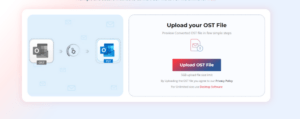
- Select the OST file.
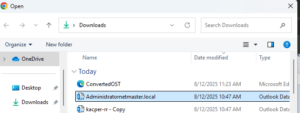
- Once the upload is complete, click Start Conversion.

- Now the tool will start converting the OST file.
- Also, you can monitor real-time progress on your screen.
- You will see two options after completing the conversion: Previewand Save PST File.
- Click on Previewto review the converted mailbox items in HTML format.
- Click on Save PST Fileto download the file.
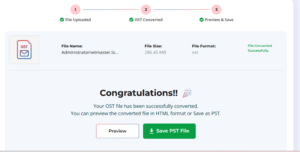
Note: You can convert OST file of up to 500 MB for free. For larger files up to 5GB, you should upgrade to its premium version.
The converted PST file is saved to your Downloads folder. You can import it into any Outlook profile by using Outlook’s Import and Export Wizard feature.
If you want to convert your OST file to PST without worrying about file size limit, then try the desktop version – Stellar Converter for OST. This tool can convert your OST data to PST, HTML, PDF, EML, and other file formats. Apart from this, the tool offers several other formats such as:
- The software displays a detailed preview of the mailbox items stored in the converted OST file.
- You can search for emails or mail items, use the “Find Message” button. Enter parameters such as “To”, “From”, “Subject”, or “Message text” in the search window to locate the emails you are searching for.
- It allows you to save and load the scanned file.
- You can convert multiple OST files in a batch.
- It preserves the original folder hierarchy.
Also, this conversion software includes an Auto-Split option that automatically splits an oversized or large PST file at around 45 GB. You can convert multiple OST files to PST files in a single batch process.
Conclusion
As discussed in this post, there are several reasons why you need to convert an OST file to PST. Regardless of the reason, you can use the online OST to PST converter by Stellar to quickly and conveniently convert the file. This online tool provides a fast and secure way to convert an OST file (even inaccessible or orphaned) of up to 500 MB to PST for free. You can go for its premium version if your OST file is larger than 5 GB. If your file is very large, then you can go for the desktop version – Stellar Converter for OST. It can convert OST files of any size to PST by maintaining the original folder structure and hierarchy.